
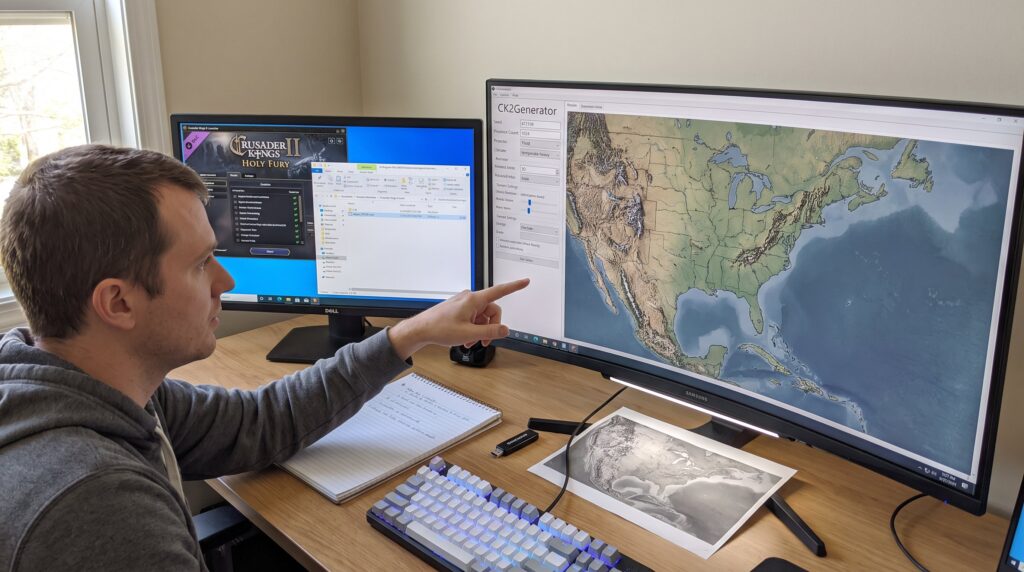
CK2Generator lets players build an entire alternate medieval world and export it as a playable Crusader Kings II mod. This guide shows how to set up, generate, customize, and share randomized CKII worlds using CK2Generator, with actionable steps, common pitfalls, and concrete examples. Readers will learn how to point the tool at their CK2 install, craft a custom map or history, fine-tune cultures and religions, and export a stable mod that others can reproduce with a seed.
Table of Contents
ToggleKey Takeaways
- CK2Generator allows you to create highly customizable, randomized Crusader Kings II worlds with precise control over provinces, cultures, religions, and dynasties.
- Setting your CK2 directory correctly and backing up existing mods are essential steps before generating and exporting new worlds to prevent data loss.
- Use CK2Generator’s filters and scripting options to tailor ruler density, cultural distribution, and custom events for unique, replayable scenarios.
- Exported worlds can be shared with others by distributing both the seed and mod folder, ensuring reproducible and consistent gameplay experiences.
- Testing new mods in a fresh CK2 profile helps isolate and solve compatibility issues or crashes effectively.
- Advanced features like heightmap import and province locking enable blending historical accuracy with randomized elements for richer gameplay.
What Is CK2Generator And Why Use It For Randomized CKII Worlds
CK2Generator is a standalone random map and history generator that builds new landmasses, provinces, cultures, religions, and dynasties and outputs them as a CK2 mod. It creates a full alternative human history or just a random map, giving far more control than Crusader Kings II’s built-in Random World option. Players use CK2Generator when they want: complete control over province counts and map size, deterministic reproducibility with seeds, and the ability to reuse the same map for multiple alternate histories.
Why choose CK2Generator over the stock tool? It supports detailed filters for ruler density, culture and religion distribution, and it can import or draw heightmaps for tailored terrain. For example, a user can set 2,500 provinces, a cold northern climate, and bias dynasty creation toward feudal names, then export a standard mod folder that the CK2 launcher accepts. That level of precision makes CK2Generator ideal for players who want unique sandbox experiences, community-mod challenges, or custom campaign settings.
Preparing Your Setup: Requirements, Backups, And Best Practices
Begin by confirming CK2 is installed and locating the main game folder: CK2Generator needs this path in its configuration tab. Back up the CK2 mod folder and any custom mods, restoring a backup saved one user from losing a decade of personal tweaks after an export replaced mod metadata. Ensure Paradox’s Holy Fury expansion is installed if mixing CK2Generator output with CK2 Random or Shattered World features.
Best practices: run CK2Generator outside the CK2 directory (unzip anywhere safe), keep a copy of the generated seed number and export date, and test every exported mod in a new, clean CK2 profile to isolate issues. If the game crashes on launch, testing with a fresh profile often reveals missing dependencies or naming collisions. These simple steps save hours of debugging later.
Creating Your First Randomized World With CK2Generator
To create a first randomized world, set the CK2 directory in CK2Generator and choose whether to generate history, map, or both. For maps, open the Map Generator, set province count (for example, 1,200–2,500 depending on detail desired), map size, and climate parameters, then click Preview to inspect coastlines and province shapes. When satisfied, choose Generate Full to build provinces, cultures, and initial dynasties.
After generation, export the result as a mod. CK2Generator drops a mod folder and a .mod file into the CK2 mod directory if correctly pointed. Activate the mod in the CK2 launcher and start a new game: the tool also writes a seed value that reproduces the same world if shared. If the exported world contains odd coastal provinces or tiny islands, re-run the generator with a slightly higher minimum province size or import a refined heightmap to reduce noise. Sharing both the seed and exported folder ensures others can replicate the exact setup.
Advanced Customization: Filters, Scripting Options, And Flavor Tweaks
CK2Generator’s core strength is its customization filters. Start each tweak with the desired fact up front: filters let users set ruler counts by tier, adjust cultural spread percentages, and weight religion creation toward specific faith types. For example, setting a 40% cultural bias can produce clustered cultural regions rather than fully randomized scatter. Users can also lock certain provinces to keep names or borders, then randomize surrounding areas for hybrid historical-random campaigns.
Seeds reproduce worlds, but scripting options alter events and flavor. CK2Generator supports custom scripts and bookmarks: the same map plus different history stop dates yields different dynasties and geopolitical outcomes. Heightmap import or drawing tools let a user paint a mountain range, then run randomization to form realistic river systems and province shapes. Advanced users report that combining a fixed heightmap with a 1,800-province target and a focused cultural bias produces replayable, narratively rich worlds that feel handcrafted.
Exporting, Sharing, And Common Troubleshooting Steps
Exported worlds appear as standard CK2 mods: the clear action is to copy the mod folder and .mod file to the CK2 mod directory and activate them in the launcher. To share, include the seed and the exported folder, others can reproduce the exact world by importing both. If a mod causes crashes, enable CK2 debug flags (-debug -debugscripts) and inspect error.log for missing files or script errors.
Common fixes: if provinces spawn without cultures or religions, re-run export with a longer generation time or increase the number of initial dynasty seeds. If names collide with existing mods, rename the mod’s internal folder and update the .mod descriptor. For community resources on mod compatibility and recommended add-ons, players consult curated lists for installation order and stability tips. When sharing, note required expansions and any recommended third-party mods so recipients avoid version mismatches.
Conclusion
CK2Generator turns randomization into a creative tool: it builds full worlds, supports deep customization, and exports playable CK2 mods. By preparing backups, testing exports in a clean profile, and sharing seeds, players can craft reproducible, richly varied campaigns. The real payoff comes from experimenting, tweaking a heightmap or culture bias often produces surprising, memorable stories worth replaying.